Library
AI Model Switcher
Kit files are in English.
Keep one model preference your agent can read and switch in plain language.
Yearly: every kit included. Monthly: one new kit per billing cycle.
 View full-size sample ↗
Access, downloads and refund policy
Yearly: every available kit and bundle, unlimited downloads.
Monthly: one new standalone kit per billing cycle, no bundles. Re-downloads are free and do not use a new claim.
Monthly subscriptions started before February 28, 2026 keep all-access, including bundles and unlimited downloads.
Monthly access currently allows three downloads per kit. Need another? Contact joozio@hey.com.
Download access while subscribed. Keep the files you download.
Already bought this? Your download link still works.
How it works
Stop juggling Claude and Codex by hand. One file holds your current preference, your agent reads it, you switch in plain English. Includes May 2026 routing recipes for Claude Code, Codex, Cursor, Aider, and local models.
The same pattern running my own setup since the multi-provider split became worth it, distilled, stripped of project-specific paths, packaged so it works on a fresh machine in under five minutes.
Latest update: 2026-09-09
September 9, 2026: Routing tables and cost notes refreshed for September 2026. The retired gpt-5-codex id was replaced with gpt-5.6-sol everywhere, including the shipped preferences template, so the switcher no longer defaults to a model Codex dropped on August 31.
What you get
Package includes
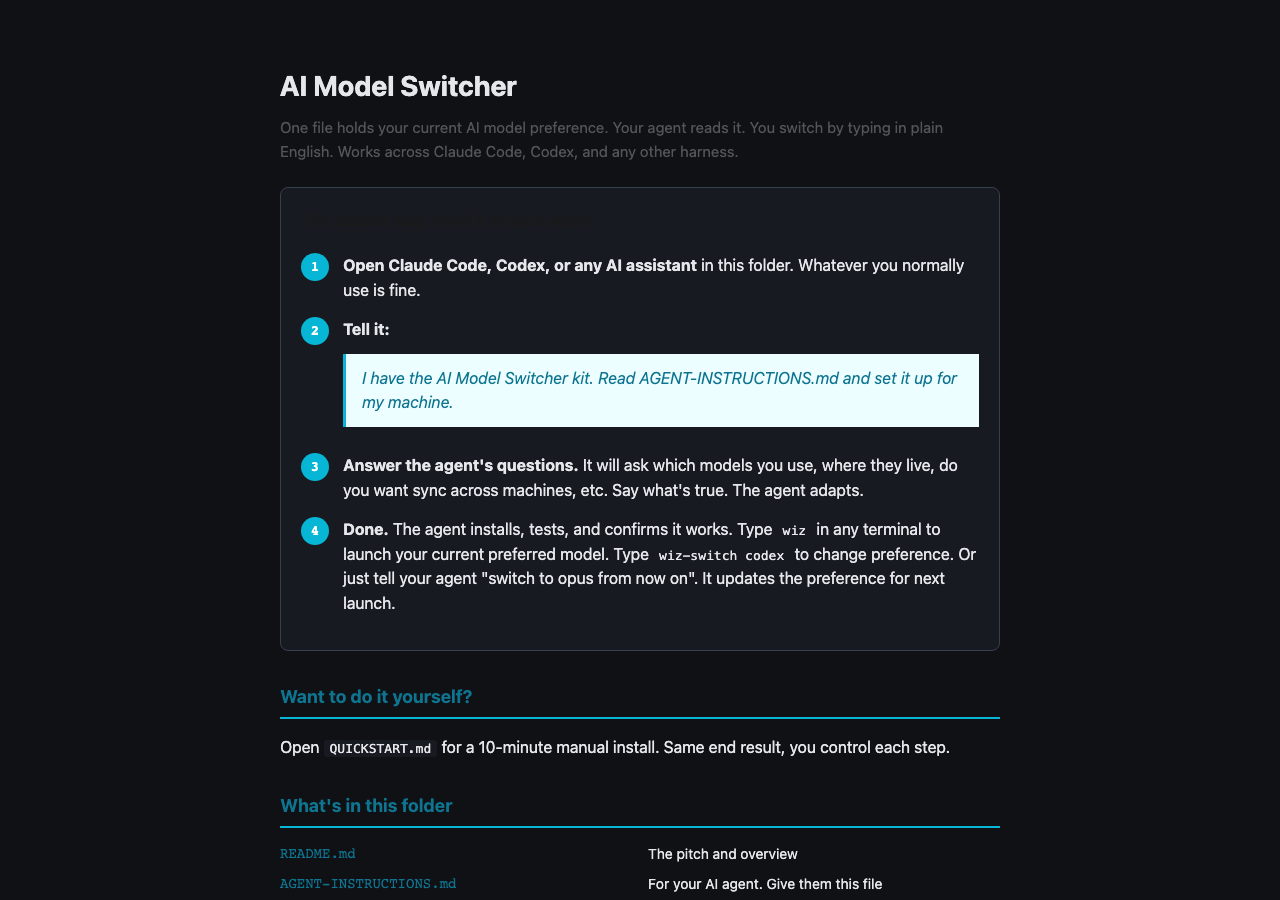
- •START-HERE.html: pretty entry-point file, four numbered steps, for non-technical users
- •AGENT-INSTRUCTIONS.md (11 KB): self-contained brief telling your AI agent how to discover, install, test, and adapt for your machine
- •README.md: human-facing pitch and architecture overview
- •QUICKSTART.md: 10-minute manual install for the DIY path
- •guide.md: full guide with sync, harness wiring, routing patterns, troubleshooting
- •cheatsheet.md: one-page command reference + common fixes
- •scripts/switcher.py: the core (no deps, single file)
- •scripts/route.sh: the launcher router that picks the right binary
- •scripts/install.sh: idempotent installer (drops scripts in ~/.local/bin)
- •scripts/claude-prompt-hook.sh: Claude Code UserPromptSubmit hook
- •harness/claude-code-skill.md: drop-in skill for ~/.claude/skills/switch-model/
- •harness/codex-AGENTS.md.snippet: append to your Codex AGENTS.md
- •harness/any-harness.md: pattern for wiring into Cursor, Aider, anything
- •examples/routing-rules.md: my actual task → model routing rules from April 2026
- •examples/harness-routing-may-2026.md: updated Claude Code, Codex, Cursor, Aider, and local-model routing recipes
- •examples/cost-notes.md: what shifted in monthly spend after splitting providers
- •templates/preferences.json: schema reference
FAQ
Do I need to be a developer to use this?
No. The whole point is that you hand the zip to your AI agent (Claude Code, Codex, Cursor) and tell it to read AGENT-INSTRUCTIONS.md. The agent does discovery, asks you a few plain-English questions about your setup, installs and tests. You never touch the code unless you want to.
Why does the model not change immediately when I say "switch"?
Because mid-session switches break your prompt cache and confuse the agent. The preference file updates instantly, but it applies on the next launch. The 30 seconds you save not relaunching costs you 10 minutes of re-explaining context to a confused model. After running this for months, durable-but-deferred is the right tradeoff.
Does this work with Cursor / Aider / my custom CLI?
Yes. The contract is two shell commands ("apply-text" to update from natural language, "resolve --shell" to read current preference). harness/any-harness.md shows the pattern. Your agent will adapt it, usually 10 lines of glue.
How does it sync across machines?
The preference is a single JSON file. Easiest sync: symlink ~/.config/ai-model-switcher to an iCloud / Dropbox / Syncthing folder. Done in 30 seconds. For audit trails, drop it in a git dotfiles repo with a 5-minute cron pull. Real-time sync needs ~80 lines on top. Pattern provided in the guide.
Is this a proxy or does it route my traffic?
Neither. It does not see your prompts and does not route your API traffic. It is purely a preference store + launcher wrapper. Your traffic goes direct to Anthropic / OpenAI / your local model exactly as it would without the kit.
How is this different from just typing "claude --model opus"?
Because you are juggling two providers, multiple harnesses, and you keep forgetting which terminal is running what. This kit makes the preference durable across sessions and visible to every harness, so you can switch by thinking instead of by remembering CLI flags.