Downloadable kit
Workbench Capacity Kit
Kit files are in English.
Know where your disk and memory go while agents run in parallel, and free space without deleting anything a tool cannot rebuild.
Python 3.9+. Built for macOS, tested on macOS and Linux. For anyone running many agent projects on one machine.
- See free disk from df, project sizes, worktree counts, and each agent's RAM and CPU across its whole process tree.
- Clear only caches their tools rebuild: a dry run first, an open-file check, and hard rules for personal folders, Docker and model files.
- Remove git worktrees idle for two weeks once they are clean and pushed, and get a warning when free space drops below your floor.
Local Python kit | ZIP, guide and reports in English | Offline demo
$29One-time payment
I'm a subscriber: check my accessYearly: every kit included. Monthly: one new kit per billing cycle.
Delivered downloads are non-refundable. Return policy
 View full-size sample ↗
Access, downloads and refund policy
Yearly: every available kit and bundle, unlimited downloads.
Monthly: one new standalone kit per billing cycle, no bundles. Re-downloads are free and do not use a new claim.
Monthly subscriptions started before February 28, 2026 keep all-access, including bundles and unlimited downloads.
Monthly access currently allows three downloads per kit. Need another? Contact joozio@hey.com.
Download access while subscribed. Keep the files you download.
Digital downloads are non-refundable once delivered. We resend broken links, replace corrupt files and review products significantly different from their description case by case. Contact joozio@hey.com with your order details. Return policy
How it works
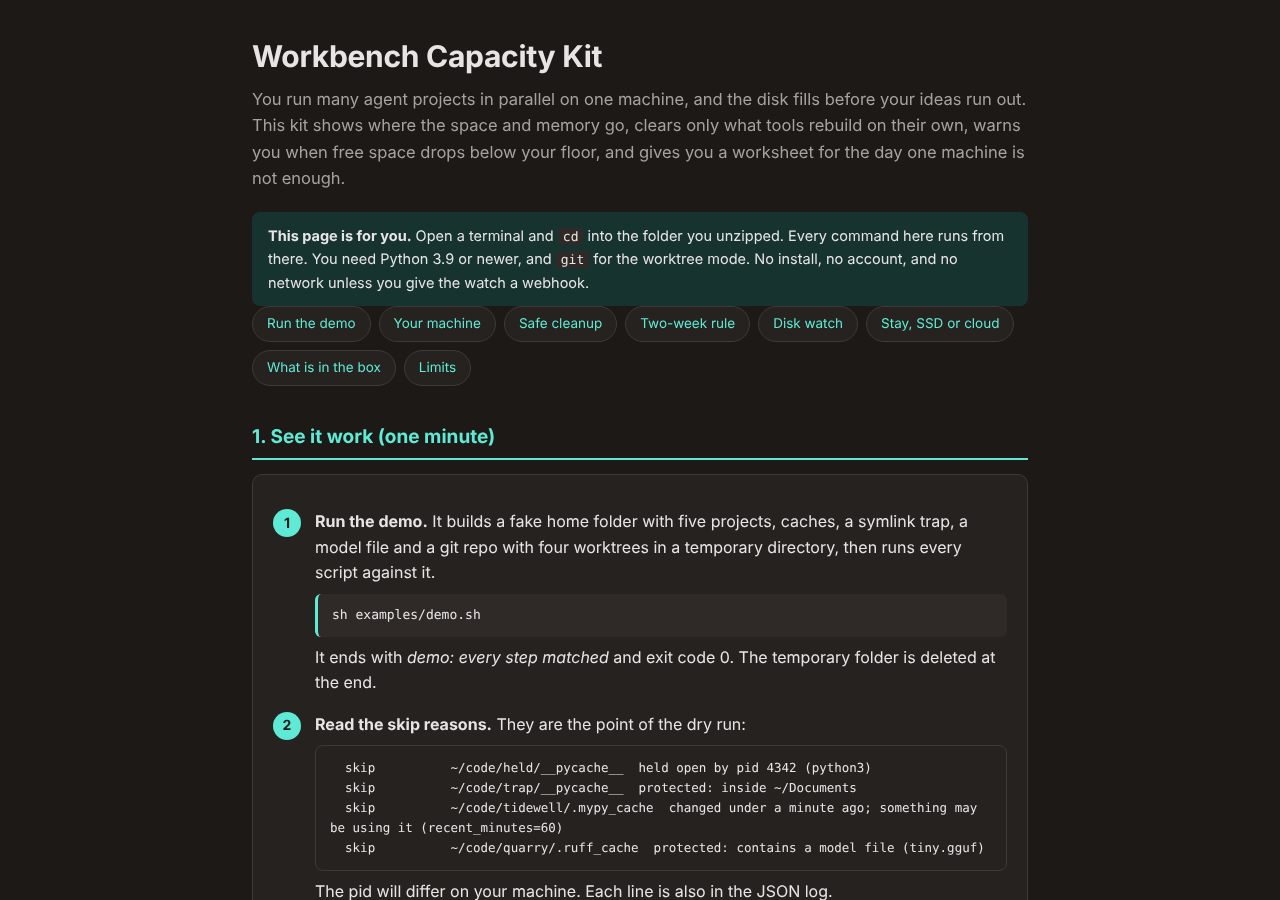
Every agent thread I run gets its own copy of my main repo, about 1.3 GB each, and for most of October my Mac Mini sat between 90 and 95 percent full. At 95 percent a cleanup script deleted a cache a running server still needed, and the server stayed broken for a week. I picked discipline over new hardware, and this kit is that discipline as scripts. A report shows free disk per volume from df, project sizes and git worktrees under the folders you list, and the RAM and CPU of each agent summed over its whole process tree. It also estimates how many more agent lanes your free disk and RAM allow after the floor and reserve you set, with the formula and inputs shown. A cleanup script clears only caches their tools rebuild, such as __pycache__ and .next/cache. It is a dry run until you add --apply, it skips anything a running process holds open, and it never touches Documents, Photos, Docker data or model files. It cannot run brew, pip or npm prunes. A worktree mode removes git worktrees in your project folders that sat idle for two weeks, and only when they are clean and pushed. A watch script warns you when free space drops under your floor. A worksheet helps you choose between staying local, an external SSD and a cloud machine. Standard library Python, no account, no network unless you add a webhook.
Built after my Mac Mini sat at 90 to 95 percent full for most of October 2026. 115 tests and the 33-check demo pass on Python 3.9, 3.11, 3.12, 3.13 and 3.14 on Linux, and on Python 3.9 and 3.14 on macOS on Apple silicon, as of October 30, 2026.
Latest update: 2026-10-30
v1.0.0 (2026-10-30). First release.
Best for
- +Anyone running several agent threads at once on one Mac, each in its own checkout or worktree
- +People whose disk sits above 90 percent most days and who want to know what is safe to delete before deleting it
- +Anyone choosing between staying local, an external SSD and a cloud machine who wants to decide with their own numbers
Not for
- -Running, stopping or scheduling agents: it measures them
- -A one-click disk cleaner: it frees only what tools rebuild and leaves Docker, models, personal folders and package managers alone
- -Windows, which is not supported
What you get
Package includes
- •START-HERE.html: the demo, your first report, a safe cleanup, the two-week rule, the disk watch and the worksheet, in that order
- •bin/capacity.py, bin/cleanup.py and bin/watch.py, each with --help and its exit codes, and bin/capacitylib.py with the allowlist and the never-touch rules
- •guide/: four chapters (reading the report, what cleanup touches, the two-week rule, the routine) and the build-host worksheet for staying local, an external SSD or a cloud machine
- •templates/: capacity.json, a launchd plist and a cron line for the watch
- •examples/: demo.sh and make-sandbox.py, which builds the synthetic workbench the demo runs on
- •tests/: 115 tests in five files
- •README.md, SETUP.md, MANIFEST.txt, CHANGELOG.md, LICENSE.txt
FAQ
Can cleanup delete something a running server still needs?
It skips anything a running process holds open (lsof, or /proc on Linux) and anything that changed in the last hour, and if neither open-file check can run it deletes nothing. Neither check can see a process that will need a file later without holding it open now, which is how my server broke. That is why cleanup only clears caches the tool that made them rebuilds on its own.
Why not just run brew cleanup or docker system prune?
A prune decides for itself what is unused. The day I wrote the post, brew cleanup --prune=all removed Homebrew's own python3 in the middle of a build. The kit can only start df, du, ps, lsof, git, osascript, notify-send, logger, vm_stat and sysctl, so it cannot run a prune even by mistake.
Which worktrees will --worktrees remove?
Linked git worktrees inside your roots with no commit, checkout or staging for 14 days (change it with --days). One goes only when its tree is clean, its HEAD is on a remote-tracking branch as of your last git fetch, no process holds it open and git has not locked it. Removal is git worktree remove without --force, and the branch stays. Ignored files such as a local .env go with the folder, so copy out what you want first. A squash-merged branch reads as unpushed and is kept, which is the safe mistake.
Has it been run on a Mac?
Yes, in part. On macOS on Apple silicon, Python 3.9 and 3.14 ran all 115 tests and the demo, and a real capacity.py report read df, found the running agent process trees with their RAM and CPU, and printed the lane estimate. Not yet run on a Mac: cleanup --apply, worktree removal, the launchd plist and a real notification, and the README says so until they are. On Linux, Python 3.9, 3.11, 3.12, 3.13 and 3.14 ran all 115 tests and the demo.
Why does cleanup free less on df than the du total said?
du counts a cloned file and the blocks it shares once per copy on APFS, so its total is an upper bound. After --apply, each step prints the change in df free space, which is the real number.
Which processes count as agents?
A process whose program name, or script name under node, python3, bun, deno or ruby, matches your agents list. The default is claude, codex, aider, gemini, goose, opencode and cursor-agent, and you can add your own names with shell wildcards.
Does anything leave my machine?
No account, no telemetry. The only network request is the webhook POST from watch.py, and only when you set a webhook URL.